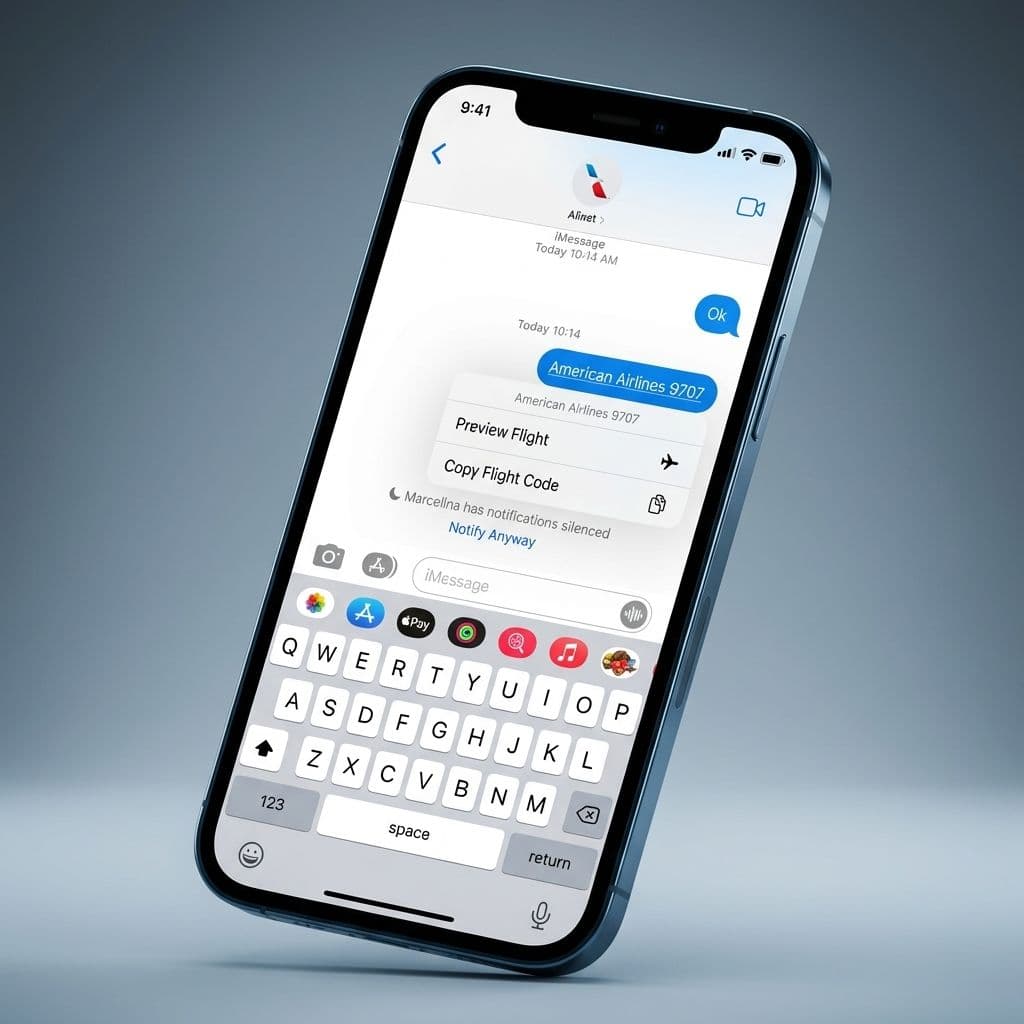
How to Use the Hidden iPhone Flight Tracker in iMessage
Team GimmieThe Secret Flight Tracker Already Living on Your iPhone
We have all been there. You are idling in the cell phone waiting lot at the airport, squinting at a flickering arrival board, or worse, frantically toggling between a text thread and a clunky airline app that refuses to refresh. You want to know exactly when your friend’s flight hits the tarmac, but the data feels miles away, buried under login screens and annoying advertisements.
It turns out that for iPhone users, the solution isn't another download from the App Store. It is already sitting inside your messages. There is a deeply integrated, sophisticated flight tracker hidden directly within the iMessage app that most people completely overlook. It is arguably the sleekest travel hack available on iOS, and once you start using it, you will wonder how you ever navigated a holiday season or a guest arrival without it.
BEYOND THE APP STORE CLUTTER
In an era of app fatigue, we are all looking for ways to declutter our digital lives. Every time you download a third-party airline app or a dedicated flight tracker, you are giving up more than just storage space. You are often handing over location data, dealing with push notifications you didn't ask for, and navigating interfaces designed more for selling upgrades than providing quick information.
The iMessage flight tracker is the antithesis of the modern, bloated app. Because it is built into the operating system, it is lightning-fast and respects your privacy. It does not need to know your life story or your email address to work. It simply recognizes a string of text and turns it into a live data feed. It is a tool of convenience that stays out of your way until the moment you actually need it.
THE MECHANICS OF THE THREE-SECOND CHECK
The beauty of this feature lies in its simplicity. It utilizes what Apple calls data detection—the same technology that lets you tap a phone number to call it or an address to open a map. Here is how you unlock the magic:
First, you need a flight number. Whether you are the one traveling or you are waiting for a guest, the flight number needs to be sent in an iMessage thread. Once that number hits the chat, the iPhone's intelligence kicks in and underlines the text, turning it into a live link.

To access the tracker, you do not even have to leave the conversation. You can either give the flight number a quick tap or a long-press (Haptic Touch). A menu will slide up, and you simply select Preview Flight. Instantly, a detailed window overlays your message thread, providing everything you need to know without the friction of switching apps.
GETTING THE SYNTAX RIGHT
If you have tried this before and it didn't work, it is likely because of a tiny formatting error. The iPhone is smart, but it needs a little bit of context to distinguish a flight number from a random string of digits.
For the tracker to activate, you must include the airline code. Simply typing 1234 will not do anything. However, if you type DL1234 for Delta, AA567 for American Airlines, or UA890 for United, the system immediately recognizes the flight. It is a small detail, but it is the key to the entire feature. If you are asking a guest for their info, remind them to send the full code. It saves you both the hassle of a manual search later.
A WINDOW INTO THE JOURNEY
The most engaging part of this feature isn't just the data—it is the visual representation of the flight itself. When you open the preview, you are greeted with a live map showing exactly where the aircraft is in the sky. You can see the little plane icon moving across the blue expanse, tracing the path from the departure city to the destination.
Beyond the map, the tracker provides high-utility details that even the official airline apps sometimes bury. You will see the departure and arrival terminals, the specific gate numbers, and a real-time countdown to landing. If the flight is delayed, the tracker updates automatically, changing the text color to alert you. For anyone who has ever stood at a baggage claim wondering which carousel to head toward, this preview often lists the baggage claim number before it is even announced over the intercom.
THE ULTIMATE TOOL FOR HOSTS AND GIFT-GIVERS
At Gimmie AI, we often talk about the intersection of technology and hospitality. This hidden tracker is a perfect example of how a small digital tool can enhance a real-world relationship.
Consider the scenario where you have gifted a trip to a loved one—perhaps a child coming home from college or a parent visiting for the holidays. Tracking their flight isn't just about timing the pickup; it is about peace of mind. By having the flight number pinned in your iMessage thread, you can check on their progress throughout the day without having to text them and interrupt their travel. It allows you to be the prepared host who is waiting at the curb the moment they walk out, making their arrival feel seamless and cared for.
If you have a guest arriving, ask them to text you their flight number the night before. You can then pin that conversation to the top of your messages. On the day of their arrival, a quick long-press on that pinned thread gives you a window into their world, ensuring you are never caught off guard by an early landing or a late-night delay.
THE FINISHED FOLD
Travel is inherently stressful, but the tools we use to navigate it should not be. The iMessage flight tracker is a reminder that sometimes the best features are the ones that don't scream for our attention. It is a quiet, powerful utility that honors your time and your privacy.
Next time you are headed to the airport—or waiting for someone who is—skip the App Store. Look at your messages instead. The information you need is already there, hidden in plain sight, waiting to turn a chaotic travel day into a well-coordinated arrival. It is a small upgrade to your digital routine that offers a massive upgrade to your travel experience.