Speed Up Your Android Phone: The 30-Second Developer Trick

Speed Up Your Android Phone: The 30-Second Developer Trick

Team GimmieTeam Gimmie
Published on March 23, 2026

Your Android Isn't Dying—It is Just Tired: The Zero-Dollar Refresh You Need to Know

We have all been there. You have had your phone for eighteen months, and suddenly, those smooth transitions feel more like a slideshow. Apps take a second longer to open, the keyboard lags just enough to be annoying, and the battery seems to be dreaming of a retirement home. Right on cue, a flashy advertisement pops up for the latest Ultra-Pro-Max-Titanium model, promising to solve all your digital woes for the low price of a monthly car payment.

At Gimmie AI, we hate that cycle. We are big fans of getting the most out of what you already own. Before you reach for your credit card or trade in a perfectly good piece of hardware, there is a hidden corner of your Android software that can make your device feel twice as fast in about thirty seconds. It is a trick long known to power users, but it is high time we brought it to the mainstream as a form of consumer advocacy. You do not always need a new phone; sometimes, you just need to tell your current one to stop being so dramatic.

The Gift of Longevity: Refreshing the Hand-Me-Down

Before we dive into the technicalities, let us talk about the gift of giving. We often think of tech gifts as shiny new boxes wrapped in plastic, but some of the best gifts are the ones that provide utility without the environmental or financial toll of a new purchase.

If you are planning on handing your current phone down to a child for their first device, or perhaps giving it to a parent who just needs a reliable way to video call the grandkids, this speed trick is essential. Giving a laggy, stuttering device to a loved one is not much of a gift. By applying this "refresh," you are essentially refurbishing the user experience. You can hand over a two-year-old flagship phone that feels snappier than a brand-new budget burner. It is a win for your wallet and a win for sustainability.

Unlocking the Secret Menu: A Step-by-Step Guide

The "engine room" of your Android phone is hidden behind a secret door called Developer Options. It is tucked away to prevent accidental tinkering, but as long as you follow these steps, you will be perfectly safe.

  1. Open your Settings app and scroll all the way to the bottom to find About Phone.
  2. Look for an entry labeled Build Number.
  3. Here is the weird part: Tap Build Number seven times in a row. You will see a little pop-up message saying, "You are now a developer!"
  4. Go back to the main Settings menu. Tap on System, then Advanced (or look for System and updates), and you will see a new entry: Developer Options.
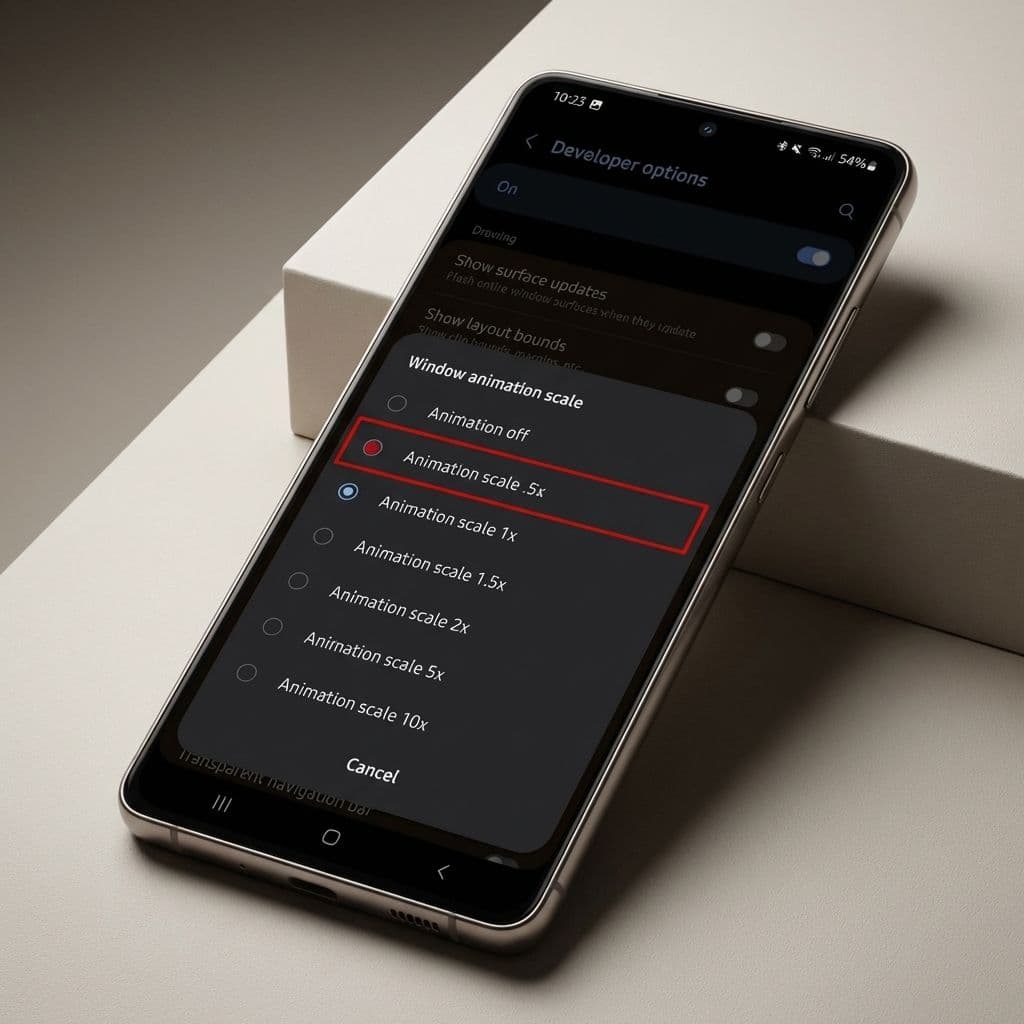
  5. Enter that menu and scroll down—it is a long list—until you find the Drawing section.

Look for these three specific settings:

  • Window animation scale
  • Transition animation scale
  • Animator duration scale

By default, these are all set to 1.0x. Tap each one and change the value to 0.5x.

If you want to go hardcore, you can turn them off entirely, but 0.5x is the "sweet spot" that maintains the visual flow while making the interface feel lightning-fast.

The Science of Perceived Speed vs. Raw Power

Now, let us manage expectations. Does this trick overclock your processor or magically add more RAM? No. If your phone is struggling to run a high-end 3D game like Genshin Impact, this tweak won’t turn it into a gaming rig.

What this does is address perceived speed. Android is full of "eye candy"—pretty little animations where windows slide into view or menus fade out. At the default 1.0x speed, these animations are designed to look fluid and cinematic. However, as a phone ages, the hardware can struggle to keep up with the rendering of those animations, or they simply start to feel like they are standing in your way.

By cutting the animation time in half, you are removing the artificial waiting periods built into the software. Your phone isn't actually calculating the data faster; it's just showing you the result twice as quickly. For 90% of what we do—opening emails, switching to Instagram, or pulling up a boarding pass—this makes the entire experience feel significantly more responsive.

The Safety Net: What Not to Touch

There is a reason this menu is hidden. While the animation scales are harmless, Developer Options contains settings that can legitimately mess with your phone’s stability if you start toggling things at random.

Think of this like opening the hood of your car. It is fine to check the oil or refill the washer fluid, but you probably shouldn't start unplugging wires just to see what happens. Our advice is simple: Change the three animation scales mentioned above and then leave. Do not touch settings like "Force 4x MSAA" or "Disable HW overlays" unless you are a literal developer testing an app. If you stick to the plan, your phone will stay stable, fast, and reliable.

When the Trick Isn't Enough: Knowing When to Fold

We would love to tell you that this one trick will keep your phone running forever, but hardware does eventually hit a wall. If your battery is swelling, your screen has more cracks than a sidewalk, or you can no longer receive critical security updates, it might be time to move on.

The good news? Because you are a savvy consumer, you do not have to fall for the $1,200 flagship trap. If our speed trick can't save your current device, look toward the budget champions. Devices like the Google Pixel 8a or the Samsung Galaxy A-series offer incredible value. They provide years of guaranteed software updates and modern hardware without the "prestige" markup of the ultra-premium models.

The Gimmie AI philosophy is about empowerment. It is about realizing that you have more control over your technology than the manufacturers want you to believe. By taking thirty seconds to tweak a few hidden settings, you are reclaiming your device's performance, saving money, and resisting the urge to participate in the endless, expensive upgrade cycle.

Try it out. Your "old" phone might just surprise you.