Skylight Calendar 2 Review: The Ultimate Digital Family Calendar

Skylight Calendar 2 Review: The Ultimate Digital Family Calendar

Team GimmieTeam Gimmie
Published on March 17, 2026

The Command Center Your Fridge Deserves: A Review of the Skylight Calendar 2

If your family’s scheduling system currently involves a chaotic mix of scribbled sticky notes, three different Google Calendars that don't talk to each other, and a frantic group text thread, you are living in the mental load danger zone. We’ve all been there—the moment you realize soccer practice was actually at 4:00, not 5:00, or that tonight was the night you volunteered to bring four dozen cupcakes to the school bake sale.

For years, we’ve tried to solve this with technology, but our phones are distraction machines. You go to check the Tuesday schedule and end up scrolling Instagram for twenty minutes instead. Skylight has been working to fix this by bringing the calendar back into the physical world, and their latest release, the Calendar 2, is the first version that finally feels like it has found the perfect balance of size, functionality, and simplicity.

The Goldilocks of Digital Displays

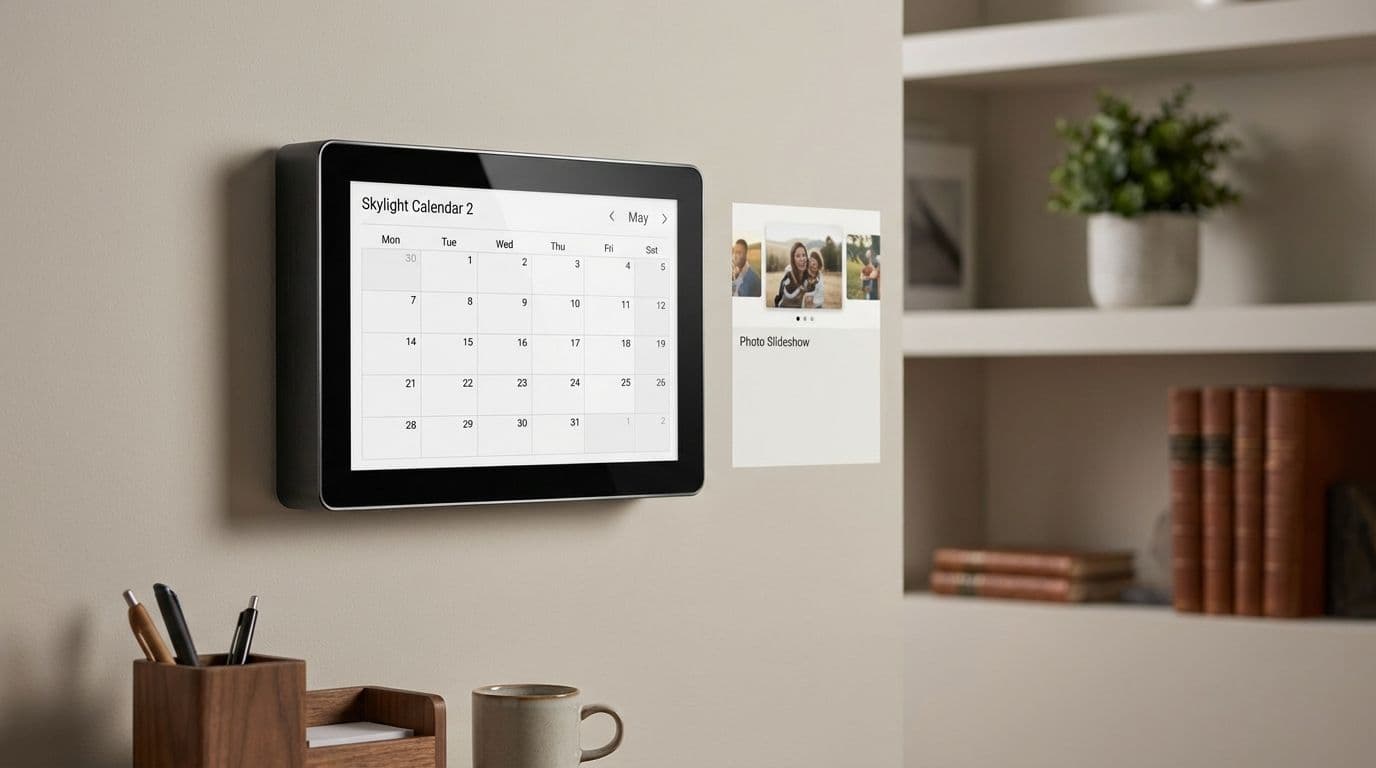
One of the biggest hurdles with previous versions of the Skylight was the physical footprint. The original 10-inch frame felt a bit cramped for a busy family of four, while the massive Calendar Max felt like you were mounting a small television in your kitchen. The Calendar 2 keeps that 10-inch screen size but improves the resolution and the interface, making it feel significantly more spacious and readable from a distance.

It is important to note the hardware logistics before you clear a spot on your wall. This is not a battery-powered tablet. The Calendar 2 requires a constant connection to a power outlet, so you’ll need to think about cord management. Fortunately, Skylight is generous with the mounting options. Out of the box, you get both a sturdy snap-in kickstand for countertop use and a wall-mount kit. Whether you want it living on the kitchen island or hanging at eye level next to the pantry, you’re covered.

The 10-inch touchscreen is bright and responsive, but its real beauty is the matte finish that doesn't catch every glare from your kitchen lights. It’s a dedicated device that does one thing well: it shows you what your life looks like today, tomorrow, and next month.

Why This Beats an iPad or an Echo Show

The most common question I get is: Why would I spend $160 on a single-use device when I could just buy a cheap iPad or an Echo Show 15? It’s a fair question, but after living with the Calendar 2, the answer becomes clear: the lack of features is actually the biggest feature.

An iPad on a stand is a distraction. The kids will inevitably use it to watch YouTube, or you'll find yourself distracted by notifications. The Amazon Echo Show 15 is a capable device, but it is increasingly cluttered with advertisements, sponsored content, and a "home screen" that changes every five seconds.

The Skylight Calendar 2 doesn't have ads. It doesn't have a news ticker. It doesn't have TikTok. It just has your family's schedule. It stays on the screen you choose, and it stays there all day. That "always-on" visibility is what creates the mental shift from "I need to check the calendar" to "I know exactly what is happening today."

The Magic of Email-to-Calendar and Magic Import

The true "killer feature" that sets Skylight apart is how it handles the input of information. We all have that one family member—maybe it’s a grandparent or a particularly tech-resistant spouse—who isn't going to log into a shared Google account to add an appointment.

Skylight solves this with a dedicated email address for your device. If Grandma wants to come over for dinner next Sunday, she can just email the details to your device’s unique address, and the event automatically appears on the screen. It is frictionless, and it works every time.

Then there is the Magic Import feature. We’ve all received those crumpled-up paper schedules for little league or the PDF flyers for school events. Instead of manually typing every single game into a digital calendar, you can simply take a photo of the paper or forward the PDF through the Skylight app. Their system parses the text and automatically populates the events. It’s not always 100% perfect, but it saves a massive amount of data entry time.

The Subscription Question: Skylight Plus

While the hardware is a one-time purchase, there is a catch you need to be aware of: the Skylight Plus subscription. At $39 per year, it’s not a dealbreaker, but it is an additional cost that unlocks some of the device's best features.

Without the Plus subscription, you get the basic calendar sync and the email-to-calendar feature. However, if you want to use the Magic Import (PDF/Photo scanning), the "Chores" feature, or use the frame as a digital photo slideshow when the calendar isn't in use, you’ll need to pay the annual fee. If you’re buying this as a gift for a grandparent, I highly recommend including the first year of Plus in your budget, as the photo-sharing feature is usually their favorite part of the device.

The Verdict: A Commitment to Coordination

The Skylight Calendar 2 is an excellent piece of hardware, but it isn’t a magic wand. Its effectiveness depends entirely on your family’s willingness to treat it as the "Single Source of Truth." If you keep your dentist appointments on a paper calendar in your purse and the kids’ sports on the fridge, the Skylight will just be a pretty, glowing decoration.

But if you commit to it—if you spend ten minutes on Sunday night ensuring the week ahead is populated—it changes the energy of the household. It reduces the "What's for dinner?" and "When do I have to leave?" questions that pepper our daily lives.

Pros:

  • Extremely simple setup that works with Google, Apple, and Outlook.
  • The email-to-calendar feature allows non-tech-savvy family members to contribute.
  • Beautiful, high-resolution screen that remains visible in bright rooms.
  • Magic Import saves hours of manual data entry for school and sports schedules.
  • Includes both a wall mount and a sturdy kickstand.

Cons:

  • Requires a $39/year subscription to unlock photo sharing and Magic Import.
  • Must be plugged into a wall outlet at all times (no battery mode).
  • At $160+, it is a significant investment for a single-purpose device.

Final Thoughts

The Skylight Calendar 2 isn't trying to be a computer; it's trying to be a digital version of the family hearth. It’s a place for everyone to gather and understand the rhythm of their week. For busy parents, caregivers of aging relatives, or anyone drowning in the logistics of a multi-person household, it’s a tool that genuinely delivers on the promise of making life a little less chaotic. If you’re willing to put in the initial effort to get the family on board, you’ll likely find yourself wondering how you ever managed without it.