Best Digital Wall Calendars 2026: Skylight vs. Apolosign

Best Digital Wall Calendars 2026: Skylight vs. Apolosign

Team GimmieTeam Gimmie
Published on March 25, 2026

The Family Command Center: Why I Traded My Paper Planner for a Digital Wall Calendar

As a product journalist, I’ve seen my fair share of gadgets that promise to change your life but end up gathering dust in a drawer. When digital wall calendars first hit the scene, I was the ultimate skeptic. My thought process was simple: Why would I spend hundreds of dollars on a screen when I already have a perfectly good calendar on the phone that’s glued to my hand? It felt like tech for tech’s sake—clunky, redundant, and destined to be an eyesore.

Then, my household schedule hit a breaking point. Between school plays, work travel, and the never-ending cycle of soccer practices, my fridge looked like a paper explosion, and my phone notifications were just white noise I’d learned to ignore. I decided to give two of the heavy hitters—the Skylight Calendar and the Apolosign—a real-world trial. After a month of living with these on my walls, my skepticism hasn't just faded; it’s been replaced by a genuine reliance on what I now call the "Family Command Center."

The Shared Visibility Factor

The magic of a wall-mounted calendar isn't about the technology itself; it’s about the psychology of shared space. When your schedule lives on your phone, it’s private. When it lives on a 15-inch or 27-inch screen in the kitchen, it becomes communal knowledge.

The biggest win wasn't for me—it was for my family. My kids stopped asking, What are we doing today? because the answer was glowing right there next to the pantry. We saw a massive reduction in the mental load of the "primary scheduler" (usually me) because everyone could see the week at a glance. But choosing the right one depends entirely on whether you value aesthetic simplicity or raw technical power.

The Aesthetic Heavyweight: Skylight Calendar

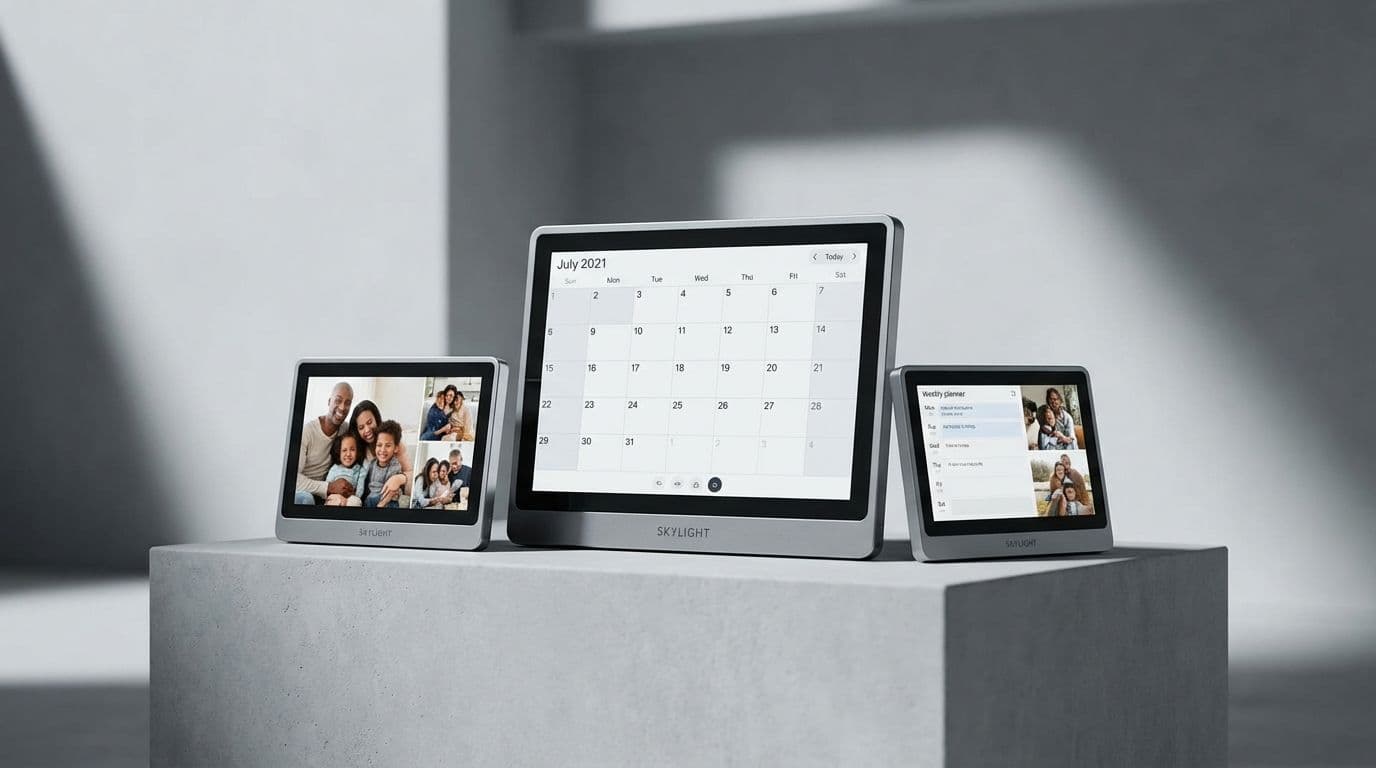
If you want something that looks like it belongs in a home rather than a cubicle, Skylight is the gold standard. I tested the classic 15-inch model ($319) and the massive new Skylight Calendar Max, a 27-inch beast that retails for around $599.

The 15-inch model is the sweet spot for most kitchens. It’s roughly the size of a large piece of mail and fits perfectly under most cabinets. The 27-inch Max, however, is a statement piece. With its aluminum frame and 2K resolution, it looks like high-end wall art.

Skylight’s biggest strength is its "Magic Import" and hands-off syncing. I hooked up my Google Calendar, my spouse’s Outlook, and the kids’ Apple Calendars in under ten minutes. The sync performance is impressive—usually reflecting changes within 60 to 90 seconds. It also doubles as a digital photo frame, which is its secret weapon for winning over tech-averse family members. When the calendar isn't in active use, it cycles through family photos, making it a piece of decor rather than a cold piece of glass.

Best For: Families who want a "set it and forget it" experience and prioritize home aesthetics.

The Tech Enthusiast’s Choice: Apolosign 24-Inch

If Skylight is the elegant photo frame, the Apolosign 24-inch Smart Board ($399 - $449) is the powerful tablet for your wall. Running on an Android-based system, the Apolosign feels much more like a computer.

The 24-inch screen is a vibrant, information-dense display that allows for significantly more customization than Skylight. You can choose different widget layouts, display the weather prominently, and even use it to browse recipes or play music. Because it’s an open system, the syncing is nearly instantaneous—I noticed Google Calendar updates appearing in less than 30 seconds.

However, there is a trade-off. The setup is more involved, and the interface can feel a bit "busy" compared to Skylight’s minimalist approach. It doesn't try to hide its tech identity; it embraces it. If you have a complex home office or a family that needs to see five different calendars, chores, and meal plans all on one screen, the Apolosign’s flexibility is hard to beat.

Best For: Power users and households with complex, multi-layered schedules who want a high-resolution, customizable hub.

The Elephant in the Room: Power and Installation

The number one question I get when people see these on my wall is: What about the cord? It’s a valid concern. These aren't battery-powered devices; they need a constant power source to stay "always-on."

For the Skylight 15-inch, the cord is relatively thin and white, making it easy to hide against light-colored walls. For the larger 27-inch Max and the Apolosign 24-inch, the power bricks are a bit bulkier.

I’ve found three ways to handle this:

  1. The Command Center Approach: Mount it directly above a kitchen outlet and use a short, right-angle adapter to keep the cord length to a minimum.
  2. Cable Racing: Use paintable D-Line cable covers. They stick to the wall and can be painted the exact color of your room, making the wire virtually invisible.
  3. The Pro Move: If you’re handy (or hiring an electrician), install a recessed "clock outlet" behind the device. This allows the plug and excess wire to sit inside the wall, giving you that perfectly clean, floating look.

Is the Subscription Worth It?

This is where you need to read the fine print. Skylight offers a "Plus" subscription for about $39 a year. While the basic calendar functions are free, the subscription unlocks the ability to share photos via email, add captions, and use the "Magic Import" feature for PDFs (like school lunch menus or sports schedules).

Apolosign generally doesn't have a mandatory subscription model for its core features, as it relies on standard Android app integrations. This makes the Apolosign a slightly better value over a five-year period, though you lose out on the polished, curated "Skylight Plus" ecosystem.

Final Verdict: Worth the Wall Space?

My initial skepticism was based on the idea that another screen would be a distraction. What I found was the opposite: by putting the "plan" in a fixed location, I actually spent less time scrolling through my phone trying to remember where I was supposed to be.

If you have the budget and want a beautiful, user-friendly device that your kids and grandparents will understand instantly, go with the Skylight Calendar Max. The 27-inch screen is a game-changer for visibility.

If you’re looking for the best bang for your buck and want a screen that can do more than just show a calendar—like display recipes or weather widgets—the Apolosign 24-inch is the smarter technical investment.

In 2026, the paper calendar on the fridge feels like a relic. These digital displays aren't just gadgets; they are the new heartbeat of the organized home. If you’re tired of the "mental load" of family management, it’s time to clear some space on your wall.