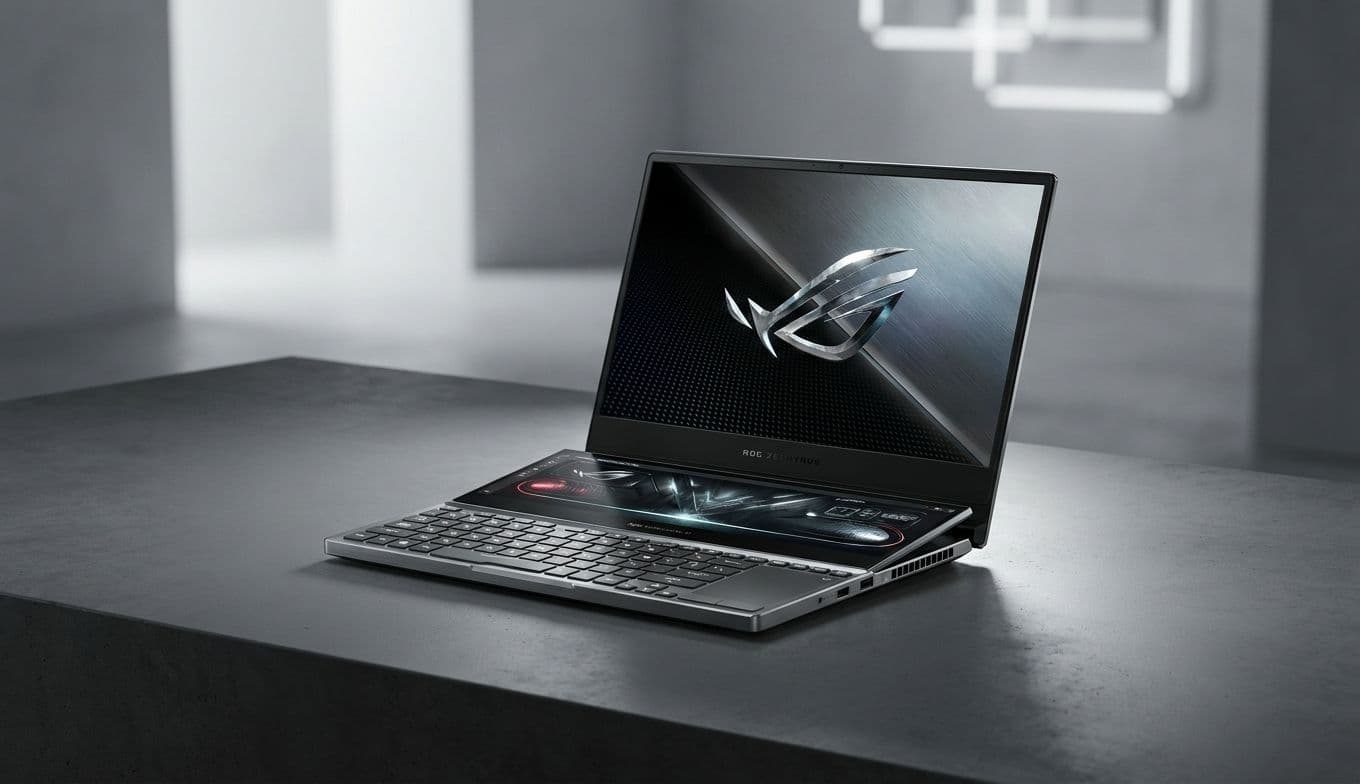
Asus ROG Zephyrus Duo (2026) Review: RTX 5090 & Dual OLEDs

Asus ROG Zephyrus Duo (2026) Review: RTX 5090 & Dual OLEDs

Team GimmieTeam Gimmie
Published on April 28, 2026

The Asus ROG Zephyrus Duo: A $5,500 Glimpse Into the Future of Over-the-Top Computing

Let’s get the sticker shock out of the way immediately: The Asus ROG Zephyrus Duo costs $5,500. For that price, you could buy a reliable used car, a first-class ticket around the world, or—in this case—the most audacious piece of portable engineering currently in existence. It is a laptop that feels like it was designed by someone who was told "no" was a forbidden word.

Is it practical? Not in the slightest. Is it a masterpiece of tech-enthusiast indulgence? Absolutely. The Zephyrus Duo isn't just a computer; it's a statement about what happens when you stop asking what people need and start asking what is possible. For the person who wants the absolute pinnacle of 2026 hardware, this isn't just a purchase—it’s an acquisition.

The Mechanical Marvel of the Dual-Screen Setup

The centerpiece of this machine is, of course, the dual-screen configuration. While other manufacturers have toyed with secondary displays, Asus has perfected the theater of it. When you open the lid, a complex mechanical hinge lifts the secondary 16-inch OLED—the ScreenPad Plus—at a 13-degree angle toward your eyes.

This isn't just for show. That tilt serves two critical purposes. First, it makes the secondary screen actually readable without you having to lean over the keyboard. Second, it opens a massive air intake for the cooling system, which is vital when you realize the sheer amount of heat being generated by the components underneath. Using it feels like sitting at a command center. You can have your primary game or video edit on the top panel, while your Discord chats, Spotify, or system monitors live on the bottom. It eliminates the claustrophobia of laptop multitasking, providing a desktop-class experience that you can actually fit in a backpack—albeit a very sturdy one.

Navigating the Ergonomic Learning Curve

There is a trade-off to all that screen real estate, and it’s one you’ll feel in your wrists. Because the secondary screen takes up the top half of the bottom deck, the keyboard and trackpad have been pushed all the way to the front edge. There is no built-in palm rest. If you’re using this on a standard desk, your wrists will be resting on the desk surface rather than the laptop itself.

It’s a different posture that takes a few days to master. Asus attempts to mitigate this by making the entire keyboard and trackpad assembly detachable. You can pop it out of the chassis and use it as a wireless Bluetooth peripheral, which is a fantastic touch if you want to prop the "monitor" section up on a stand. However, if you’re using it on your lap, be prepared for a bit of a balancing act. It’s an enthusiast’s layout that prioritizes screen utility over traditional laptop comfort, and it’s a compromise you have to be willing to accept for the dual-OLED life.

What Does an RTX 5090 Actually Enable?

It’s easy to look at the spec sheet and see "RTX 5090" and "Intel Panther Lake" as just big numbers, but in practice, this hardware changes your workflow. We aren't just talking about "playing games on high settings." We’re talking about playing the most demanding titles in native 4K at triple-digit refresh rates without breaking a sweat.

Beyond gaming, the 5090 is a beast for local AI development. If you’re someone running large language models locally or working with intensive AI-driven video upscaling, the VRAM and core count here are transformative. You can train models or render complex 3D scenes in minutes that would take other high-end laptops an hour. Combined with the 16-core Intel chip, this is a workstation disguised as a gaming rig. It handles the most intensive multitasking scenarios—like streaming 4K gameplay while running broadcast software and a dozen browser tabs—with a level of grace that feels almost unfair to other laptops.

The Ultimate Milestone Gift

At $5,500, the Zephyrus Duo moves past the realm of "standard tech purchase" and into the category of a milestone gift. This isn't the laptop you buy because your old one is getting a bit slow; this is the laptop you buy to mark a life-changing achievement.

Think of it as the ultimate reward for a major career promotion, like finally making Partner at a firm or closing a massive deal. It’s the perfect "congratulations" for a grueling law school graduation or completing a PhD. If you have a partner or a child who is a hardcore tech enthusiast hitting a 40th birthday or another decade milestone, this is the kind of gift that becomes a core memory. It’s the "Rolex of laptops"—an item that is as much about the prestige and the "wow" factor as it is about the incredible utility it provides. It’s for the person who has everything and wants to see what the bleeding edge feels like.

A Masterpiece of Niche Engineering

The Asus ROG Zephyrus Duo is a beautiful, loud, and expensive contradiction. It is heavy, the battery life is predictably short when you’re powering two massive OLEDs and a flagship GPU, and the fans will let you know they’re working when you push the system to its limits.

But for the right person—the professional creator who needs a portable studio, the streamer who wants a mobile command center, or the enthusiast who simply wants the most powerful laptop on the planet—those trade-offs are trivial. Asus has built a masterpiece that refuses to blend in. It’s a high-performance, dual-screen monster that delivers exactly what it promises: a computing experience unlike any other. Just make sure you have the desk space—and the occasion—to justify the investment.